Organizations need efficient and secure file transfer methods. They can reap the benefits of SFTP on AWS. AWS Transfer Family offers a robust solution for managing file transfers using various protocols, including SFTP (SSH File Transfer Protocol). This service simplifies the setup and management of file transfers, providing numerous benefits for businesses of all sizes.
Setting up an SFTP server with AWS Transfer Family is straightforward. With just a few clicks in the AWS Management Console, you can create a server and configure it to meet your specific requirements.
Flexible Authentication:
AWS Transfer Family supports multiple authentication methods, including AWS Directory Service, IAM roles using just the service itself, and custom identity providers like Microsoft Active Directory. This flexibility allows you to choose the authentication method that best suits your needs.
Scalability:
AWS Transfer Family scales effortlessly as your business grows to accommodate increased file transfer demands. You can easily adjust server capacity and storage to match your requirements.
Security:
AWS Transfer Family offers built-in security features to protect your data during transfer. It supports encryption in transit and at rest, ensuring that your files remain secure at all times.
Integration with S3:
AWS Transfer Family integrates seamlessly with Amazon S3, allowing you to store files in S3 buckets. This integration simplifies file management and provides a scalable storage solution.
Cost-Effective:
‘With AWS Transfer Family, you only pay for what you use. There are no upfront fees or long-term commitments, making it a cost-effective solution for file transfer needs.’With AWS Transfer Family, you only pay for what you use. There are no upfront fees or long-term commitments, making it a cost-effective solution for file transfer needs.
By leveraging AWS Transfer Family, businesses can streamline their file transfer processes, improve security, and scale their operations efficiently. Whether you’re a small business or a large enterprise, AWS Transfer Family offers the flexibility and scalability you need to manage your file transfer requirements effectively.
To take advantage of the benefits of SFTP on AWS and learn more about setting up an SFTP server using AWS Transfer Family, check out our detailed guide: SFTP (SSH File Transfer Protocol) in AWS Transfer Family – Setup Instructions. This quick how-to guide will walk you through the process of creating an SFTP server and configuring it to meet your specific needs.
As of March 1st, Russia has implemented a ban on VPN services, marking a significant step in its ongoing efforts to regulate access to information and increase surveillance. This move has raised concerns not only for Russian citizens but also for US businesses operating in or dealing with Russia.
For Russian citizens, the ban means a further restriction on their ability to access unrestricted information and communicate privately online. VPNs are often used to bypass government censorship and access content that may be blocked or restricted by authorities. With VPNs now banned, Russian citizens may find it more challenging to protect their privacy and access the open internet.
From a business perspective, the VPN ban in Russia could have several implications for US companies. Many businesses rely on VPNs to secure their communications and data when operating in countries with less secure internet infrastructures or higher levels of surveillance. With VPNs banned, US businesses operating in Russia may face increased cybersecurity risks, as their communications and data may be more vulnerable to interception.
Furthermore, the ban on VPNs could also impact US businesses that have operations in Russia or rely on Russian markets for revenue. Restrictions on internet access and communication could hinder the ability of these businesses to operate effectively and could potentially lead to increased costs or disruptions to their operations.
Overall, the VPN ban in Russia highlights the challenges of navigating the complex regulatory environments and cybersecurity risks businesses face when operating in global markets. US businesses operating in or dealing with Russia will need to carefully assess the implications of this ban and take steps to mitigate any potential risks to their operations and data. Read more at https://www.vpnmentor.com/news/report-russia-vpn-ban/
In the ever-evolving landscape of cloud computing, security remains a top priority for organizations. Threat modeling is a crucial step in identifying and mitigating potential security risks. One popular framework for threat modeling is the STRIDE model, developed by Microsoft. Let’s explore how the STRIDE model can help enhance the security of your AWS environment.
What is the STRIDE Model?
The STRIDE model categorizes threats into six categories, each representing a potential attack vector:
Spoofing: This refers to the act of impersonating a user, system, or service to gain unauthorized access. In an AWS environment, spoofing could occur if an attacker gains access to AWS credentials or keys.
Tampering: Tampering involves modifying data or code without authorization. In AWS, tampering could occur if an attacker intercepts and alters data in transit or modifies data stored in AWS services.
Repudiation: Repudiation refers to the ability to deny that a specific action took place. In AWS, this could include denying that a particular API call was made or that a resource was accessed.
Information Disclosure: This involves the unauthorized disclosure of information. In AWS, information disclosure could occur if sensitive data is exposed through misconfigured permissions or insecure storage.
Denial of Service (DoS): DoS attacks aim to disrupt services and make them unavailable to users. In AWS, DoS attacks could target AWS services or applications running on AWS infrastructure.
Elevation of Privilege: This refers to gaining higher privileges than authorized. In AWS, elevation of privilege could occur if an attacker exploits a vulnerability to gain administrative access.
Applying the Threat Modelling in AWS
To apply the STRIDE model in AWS, start by identifying potential threats in each category based on your AWS environment’s architecture and configuration. For example:
Spoofing: Ensure that AWS credentials and keys are stored securely and rotated regularly to prevent unauthorized access.
Tampering: Use AWS services such as AWS CloudTrail and AWS Config to monitor and detect unauthorized changes to your resources.
Repudiation: Enable AWS CloudTrail logging to track API calls and resource access, providing an audit trail for accountability.
Information Disclosure: Implement encryption for data at rest and in transit to protect against unauthorized disclosure.
Denial of Service: Use AWS Shield to protect against DDoS attacks and ensure that your application is resilient to traffic spikes.
Elevation of Privilege: Apply the principle of least privilege and regularly audit permissions to minimize the risk of unauthorized access.
By applying the STRIDE model in your AWS environment, you can identify and mitigate potential security threats, helping protect your cloud data and applications. As a next step, you can subscribe to the AWS Security Blog, consider joining the Cloud Security Alliance, and have Tech Reformers conduct a Well-Architected Framework Review of your workload.
When customers running VMware on-prem consider the cloud for backup or even migration, they sometimes want to stay on their current hypervisor. Organizations stay with VMware because of their skillset and familiarity or they need to move quickly with what they have. They have a challenge. They need to find a solution that doesn’t require changing their whole system. At the same time, they need to keep their applications and data safe. VMware Cloud on AWS is the answer. It provides an easy way to move from on-premises environments to the cloud. This can be done just for backup. Or it can be a full migration.
Overview: Backup and Restore with VMware
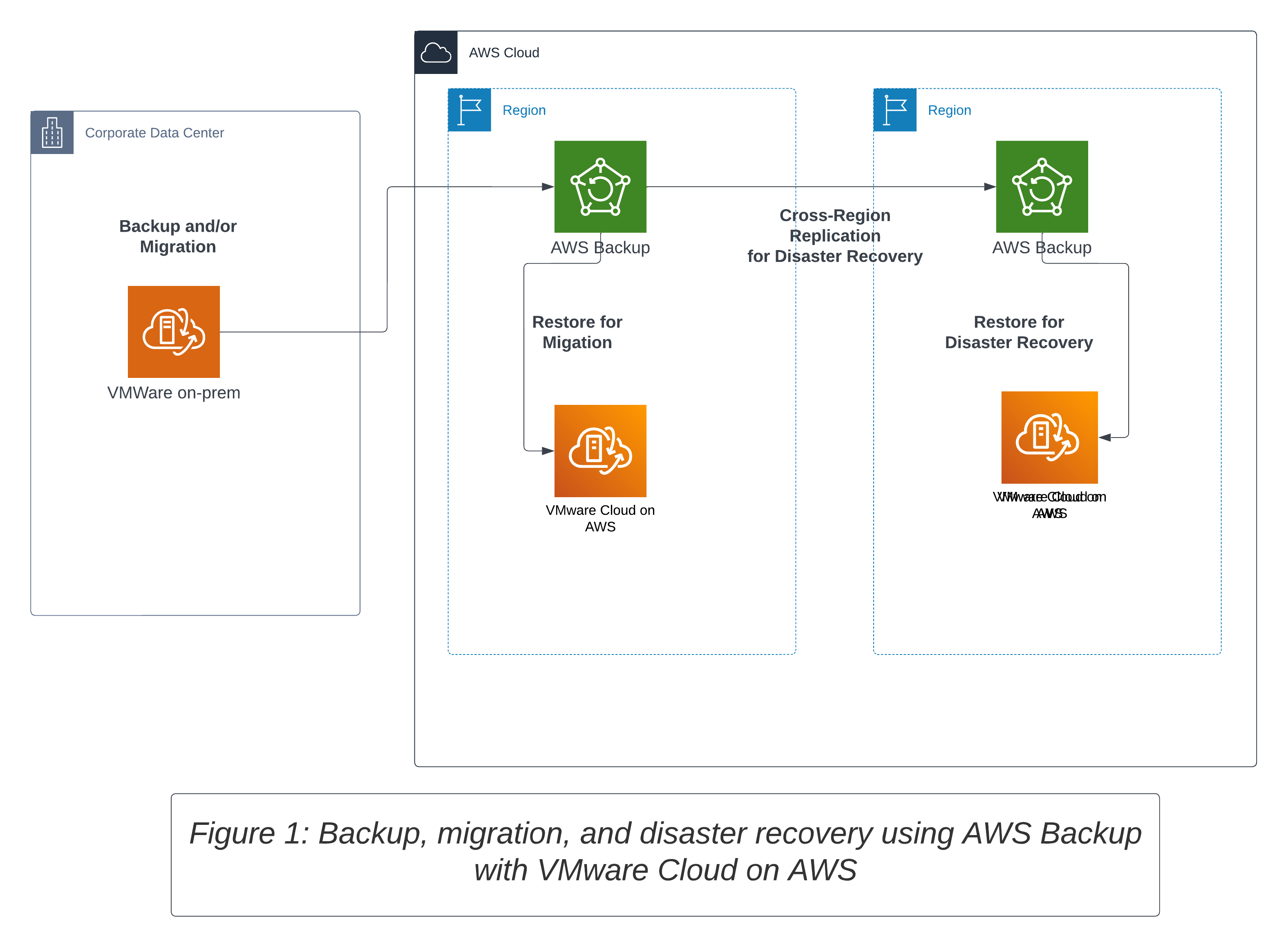
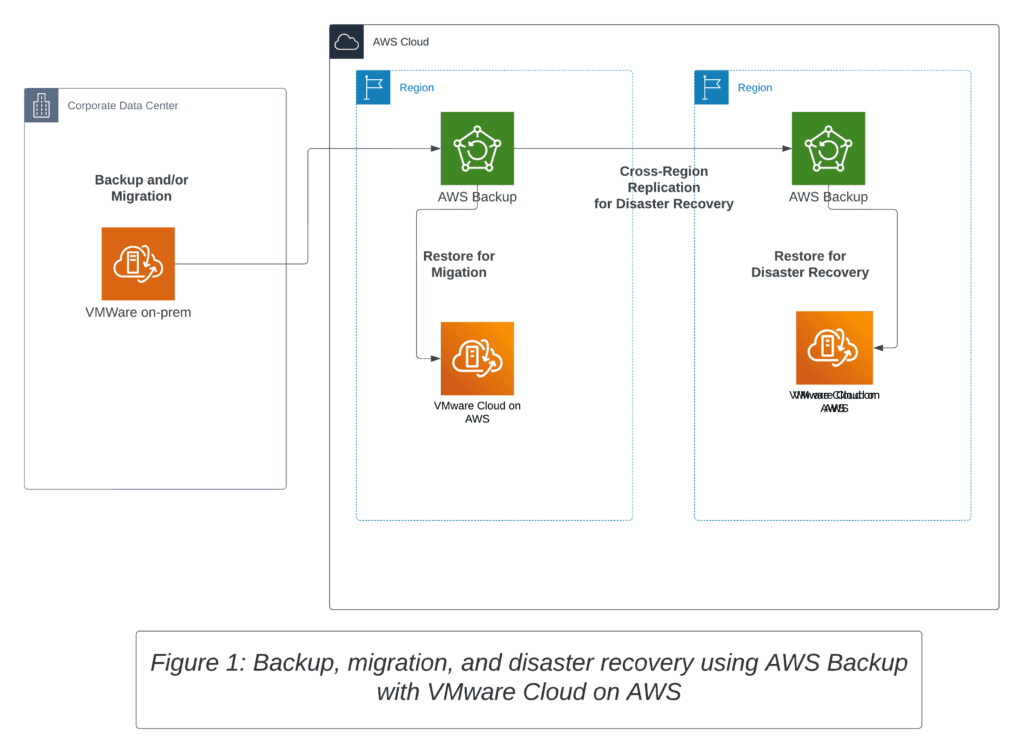
AWS Backup, a fully managed backup service, easily centralizes and automates data backup across AWS services in the cloud and on-premises environments. When it comes to backing up on-premises VMware workloads, AWS Backup integrates seamlessly with VMware Cloud on AWS. Customers can back up their on-premises workloads to the cloud with AWS Backup and then restore the backups to VMware Cloud on AWS. This enables a streamlined migration process that’s secure, efficient, and doesn’t require additional operational complexity.
VMware Disaster Recovery
When it comes to disaster recovery, VMware Cloud on AWS, in conjunction with AWS Backup, provides a robust solution. Customers with strict Recovery Point Objective (RPO) and Recovery Time Objective (RTO) requirements have good options. They can use VMware Cloud Disaster Recovery and VMware Site Recovery. These solutions will meet their needs for keeping data safe and recovering it quickly. However, AWS Backup offers a simpler approach for smaller migration or more flexible disaster recovery requirements.
In the event of a regional disaster, customers can leverage the cross-Region copy capability of AWS Backup to copy the backups to a different AWS Region. This ensures that customers can restore their backups to VMware Cloud on AWS in another region, thereby ensuring business continuity.
Migration
Using VMware Cloud on AWS for migration has significant benefits. It lets customers move their on-premises VMware workloads to the AWS cloud. This process helps scale their data protection solution in a cost-effective way. With AWS Backup, customers can set the backup frequency based on their Recovery Point Objective (RPO) requirement in the backup plan. This level of customization ensures that customers only pay for what they need, thereby keeping costs in check.
Cost Considerations:
When considering a migration or disaster recovery solution, it’s important to consider the associated costs. AWS Backup and VMware Cloud on AWS provide cost-effective solutions that provide flexibility in storage and restore options. Implementing lifecycle rules in AWS Backup can help customers maximize the benefits of lower-cost storage options, thereby further reducing costs.
Consider using the AWS Backup lifecycle feature to automatically transition your recovery points from a warm storage tier to lower-cost cold storage for archival use cases.
Conclusion
For organizations running VMware workloads on premises, the combination of AWS Backup and VMware Cloud on AWS offers a comprehensive solution for backup, migration, and disaster recovery. This solution not only ensures that customer data is protected and secure but also provides a cost-effective and efficient way to migrate to the cloud. For details for implementation, read the prescriptive guidance from AWS. Using AWS Backup and VMware Cloud on AWS helps customers relax, knowing their important business applications and data are safe in the cloud.
At Tech Reformers, we know how critical technology is in today’s K-12 educational environment. Schools and districts are continually seeking ways to enhance learning, support teachers, and improve overall operations. But budget concerns are always an issue. I have some good news. Amazon Web Services (AWS) is now offering its Global Data Egress Waiver (GDEW) to K-12 customers.
The Journey to the Cloud, Simplified
Embracing cloud technology can be a game-changer for educational institutions. AWS is the perfect partner in this journey, providing on-demand, pay-as-you-go compute and storage services. This approach enables schools to shift from capital infrastructure expenses and upfront costs. AWS offers a pay-as-you-go model with more manageable operational expenses. The flexibility and scalability of AWS services ensure that districts and schools can adapt to changing needs while keeping costs in check.
And remember, Districts and schools start with a Free Tier Account, which provides 12 months of free access to many services. But once the free period ends or usage exceeds the free-tier limits, costs can become a big worry.
Maximizing the Benefits with the Global Data Egress Waiver
K-12 IT staff get worried about the variable cost of egress when downloading their files. To support K-12 Education, AWS offers the Global Data Egress Waiver (GDEW). Under normal circumstances, this will waive any download costs. It makes AWS less expensive and easier to budget.
The GDEW is specifically designed to support K-12 education, offering a maximum discount of 15% on total monthly AWS spending. The 15% of the total AWS spend is several times the egress AWS typically sees among its Education customers. This discount, coupled with no cost for uploading data to Amazon Simple Storage Service (Amazon S3) and free data egress from S3 to Amazon Elastic Compute Cloud (Amazon EC2) within the region, significantly reduces the barriers for schools and districts looking to leverage AWS’s cloud storage, computing, and database services.
The Global Data Egress Waiver (GDEW) allows K-12 districts and schools to avoid fees for downloading data from Amazon S3 buckets.
The Impact on Student Outcomes
By minimizing or even eliminating data egress fees, school districts can increase agility and security, reduce costs, and analyze data faster, leading to improved student outcomes. Technology leaders in districts will have more resources and flexibility to innovate and tailor solutions that meet the unique needs of their students and educators.
Eligibility and How to Apply for the Data Egress Waiver
AWS’s data egress waiver is available to K-12 education customers who meet the following criteria:
Located or reside in the US
Work at an educational institution, such as a public or private K-12 school, in a district, regional, or state administrative office of a public educational institution, or for the boards of education in the US
Use district/school/LEA e-mail addresses for AWS accounts
Work in an approved AWS Region
Data Transfer Out Must Be Via AWS Direct Connect or Over NRENs from Peered AWS Regions
To request the AWS Data Egress Waiver, contact your AWS Account Manager or complete the form below, and we’ll work with them to initiate the request.
In conclusion, AWS’s GDEW is an incredible opportunity for K-12 schools and districts to accelerate their digital transformation journey. As an AWS Public Sector Partner specializing in K-12, Tech Reformers is here to help you navigate this process and make the most out of the tools and services offered by AWS. Let’s work together to harness the power of technology and create a brighter future for our students!
🌍 If you’ve been seeking a simplified intoduction into the world of cloud computing, you’re in the right place. I’ve been down this road, and my experience with Amazon Web Services (AWS) has truly been a transformative journey into the cloud
🎈 WHAT Exactly is AWS?
Starting with the essential WHAT. AWS is Amazon’s robust platform that provides unparalleled computing power, expansive data storage, and top-tier security in the cloud. Picture this: Massive Amazon data centers dotted globally, each packed with state-of-the-art IT infrastructures. These centers allow you to harness powerful computing capabilities without the need for extensive on-site equipment.
What is AWS
Having personally navigated AWS for over 5 years, I find services like EC2, S3, and RDS to be particularly beneficial. EC2 lets you scale computing capacity based on your needs, S3 offers virtually limitless storage, and RDS ensures smooth database operations — a complete package!
For the sports enthusiasts among us, those captivating NFL NextGen Stats that come alive during games? They’re fueled by AWS! It’s impressive to see real-time player insights and detailed stats seamlessly integrated, showcasing AWS’s versatility. 🏈 Imagine what you can do with your data.
🌟 WHY Choose AWS Over Traditional Data Centers?
Moving to WHY AWS over traditional data centers? In my experience, AWS has several advantages:
Cost-Effective: Instead of shelling out for expensive hardware, maintenance, and upgrades, AWS operates on a pay-as-you-use model. This flexibility allowed me to optimize costs and only pay for what I used.
Scalability: AWS services, like EC2, can be scaled up or down based on demand, eliminating the guesswork of capacity planning.
Enhanced Security: AWS is committed to top-tier security. Their data centers have robust physical security, and on the digital front, they provide tools to ensure data privacy and protection.
Innovation: AWS’s suite of over 200 services is continually evolving. This means you have access to the latest and greatest tools without the hassle of frequent in-house upgrades.
Reliability: AWS’s global infrastructure ensures high availability and fault tolerance. No more sleepless nights worrying about server downtimes.
Resource Management: AWS allows for automated backup, software patching, and hardware maintenance. I found myself free from routine IT management tasks, able to focus on core projects.
Microsoft and Windows Servers on AWS makes a lot of sense. Organizations have been running Microsoft Workloads on AWS for over 16 years, longer than any other cloud provider. AWS offers the best platform for Windows Server and SQL Server for higher performance and reliability, greater security, more migration support, the broadest and deepest capabilities, lower total cost of ownership, and flexible licensing options. With Tech Reformers’ expertise, we can help you lift-and-shift, refactor, or even modernize your Windows workloads.
🚀 HOW Did I Dive into AWS?
Finally, the HOW. If you’re considering AWS, I’d recommend starting slow. Introduce cloud computing services like EC2, S3, and RDS to understand their capabilities. Over time, you can explore bundled packages or even add on security services. Tech Reformers AWS QuickStart is a great way to get your environment set up correctly.
In my experience, AWS revolutionized the way I viewed cloud computing. It’s an efficient, cost-effective solution for those looking to harness advanced IT services without the challenges of traditional data centers. If you’re on the fence, give AWS a shot – it might just be the solution you’ve been searching for! 🎉🚀
The serverless paradigm, once a promising glimpse into the future of cloud computing, has now comfortably taken its seat at the tech table. Datadog’s ‘State of Serverless 2023‘ report affirms this by highlighting the impressive growth in serverless ecosystems, especially with the advent of container-based applications.
What is Serverless?
When we say “serverless,” it doesn’t mean there are no servers. Yes, that’s counterintuitive. What we mean is there are no servers for the customer to manage. The management of the server hardware, scaling, and operating system are all managed by the cloud provider. The customer only needs to manage the code. Besides not managing the underlying infrastructure, customers only pay for what they use. For example, in AWS Lambda, you only pay when a function is invoked. Likewise, with AWS Aurora Serverless, charges occur when the database is called.
Who are the Players?
Cloud giants like AWS and Google Cloud are leading the revolution to outsource server management, with a vast majority of Datadog clients embracing this technology. Not to be forgotten, Azure trails close behind. But it’s AWS, with its diverse offerings, that’s particularly eye-catching. Take AWS Lambda, for instance, a pioneering serverless computing service that automatically runs your code without needing to provision or manage servers. Couple that with AWS’s other marvels like App Runner for containerized apps, Fargate for serverless compute for containers, and CloudFront Functions for edge computing. It’s clear AWS isn’t just riding the wave – it’s shaping it.
Sample Architecture
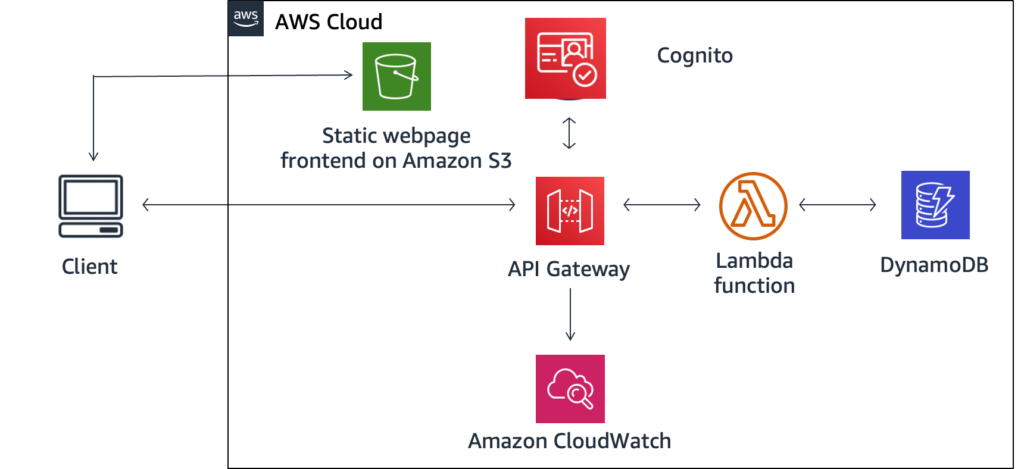
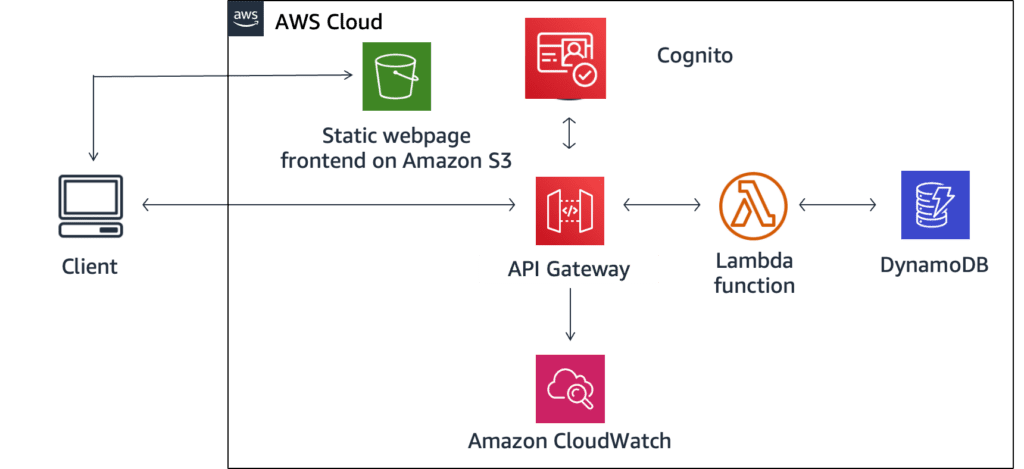
In the sample serverless architecture below, the client browser requests a static webpage hosted in Amazon S3, which is storage with web hosting capabilities. Using this webpage, the client browser communicates with API Gateway using a REST API. API Gateway authenticates and authorizes (using Cognito) the request and invokes a Lambda function communicating with DynamoDB.
Frontend development has also joined the serverless fiesta. Platforms such as Vercel, Netlify, Cloudflare, and Fastly are expanding their horizons by providing capabilities tailored for front-end needs. This evolution reveals a fascinating shift in web development priorities, emphasizing scalability, performance, and deployment ease.
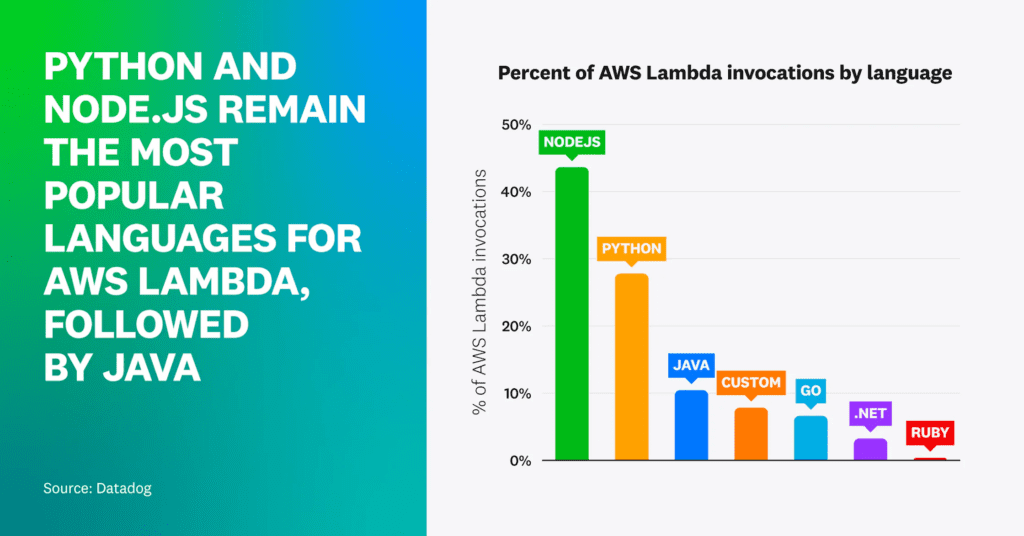
Regarding deployment tools, Terraform has emerged as a top choice, especially for AWS Lambda deployments among larger organizations. This underscores Terraform’s adaptability for complex workloads. And when it comes to the developer’s choice of language for AWS Lambda? Node.js and Python remain firm favorites, but Java is making waves, a testament to enterprises warming up to serverless wonders.
Serverless, the bottom line
Though the findings are based on Datadog’s cloud-savvy clientele, the message is clear: serverless is not just a fleeting trend. It’s the present and future of efficient and innovative cloud computing. And with AWS at the helm, the serverless sky seems limitlessly bright!
Tech Reformers can help you explore serverless options for your workloads.
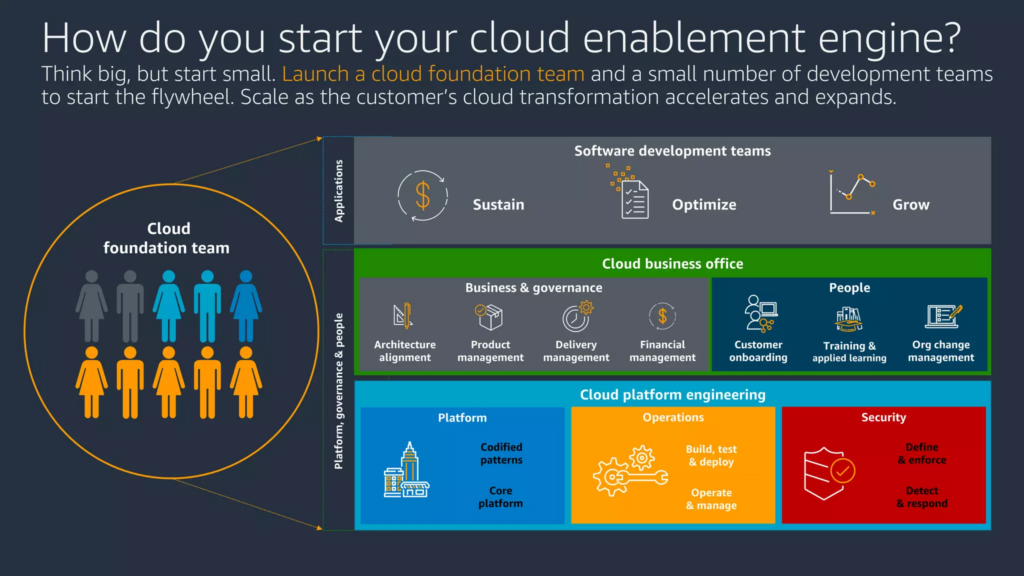
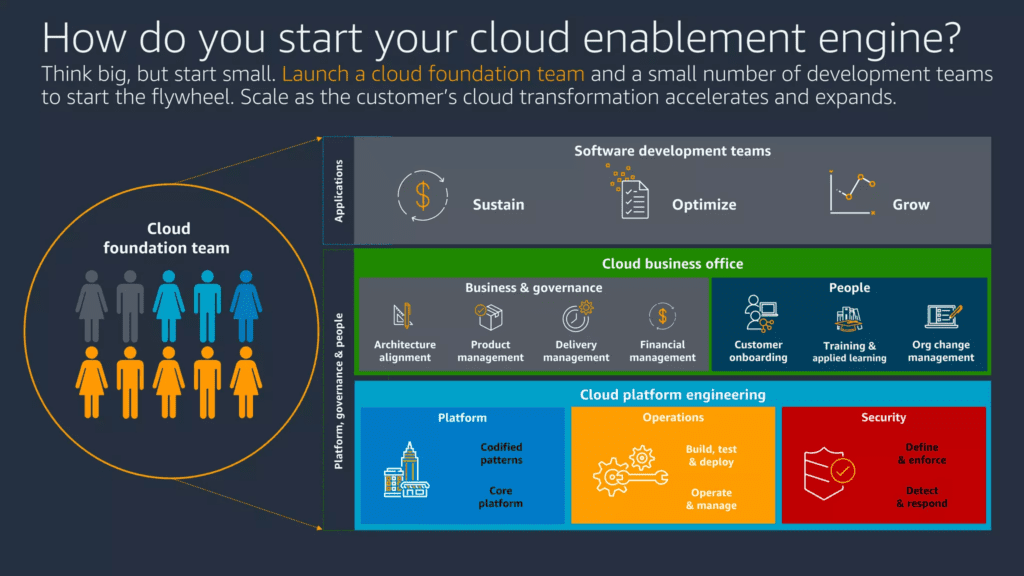
As an AWS partner, Tech Reformers, strives to help organizations to innovate with the cloud. The goal is innovation while improving information technology (IT) in six areas: operational excellence, security, reliability, performance efficiency, cost optimization, and sustainability, The 6 Pillars of the AWS Well-Architected Framework. The Cloud Enablement Engine (CEE) is a guiding process bringing together the business and technology teams and, in education, the instructional team. The goal is a digital transformation moving from an on-premises operating model to a Cloud Operating Model (COM) to achieve district goals.
“a multi-disciplinary team that is assembled to implement the governance, best practices, training, and architecture needed for cloud adoption in a manner that provides repeatable patterns for the larger enterprise to follow.”
He cites research and experience that shows the best team is not a well-honed IT team, a successful project team, or an egalitarian mix of staff. Transformation enterprisewide is more likely when there is a mix of “A-team” players with success in IT and project management working with “new blood” that brings in a supply of new ideas relevant to the district.
The team must have top-down support from an influential executive sponsor. In school districts, this would be the superintendent or other cabinet leader. A key pattern for success is to have not just an executive sponsor but an Executive Cloud Steering Committee that includes senior executives that are not on the CEE. They serve as the North Star and ensure the CEE is in support of district strategy and goals.
The CEE is ready to go upon completion of the 5 kick-off activities:
Build the team
Train and coach
Pilot projects
Architect for the cloud
Operate in the cloud.
Build the Team
The initial team member may be the CIO, CTO, or director in IT with hands-on experience who knows the capabilities of AWS but also has the political capital to bring in business leaders aboard with the CEE. With other leaders on board, the goal is to build a ‘two-pizza” team, small enough to share a couple of pizzas. To start, less is more. Technology is the team focus initially. Some successful organizations have also had a larger cross-functional Cloud Steering Committee that ensures progress, removes roadblocks, and helps with decision-making that affects the organization.
Train and Coach
Initial members beyond the leader may include infrastructure, networking, and operations which will be cloud leaders. Core member training is the next step. Creating learning paths and training in cooperation with Human Resources creates a process for extending cloud adoption. The CCE team leverages the AWS Well-Architected framework and will become familiar with AWS reference architectures, AWS Quick Starts, and AWS Solutions. Successful CEE implementations include AWS training for the entire organization. At AWS, for example, every employee becomes a Certified Cloud Practioner. Districts could have a Cloud 101 that covers the core of transforming with the Cloud.
IT probably has an existing Project Management Office (PMO) or project management team. This team is critical to the success of the CEE. They are closely aligned with the business verticles and should be armed with agile project management skills. Now a Cloud PMO, the team can create a manifesto to guide decision-making for project onboarding, process changes, role definitions, organizational changes, cloud architecture, and cultural change. Communication skills are the key to bringing the organization along the cloud journey.
Pilot Projects
The CEE then develops pilot projects in a lab environment. It’s important to keep the sponsor and senior leadership engaged in the progress and aware of the pilot projects. What pilot may have an impact beyond the IT team? Identify pilots that could improve the business, have the potential to save money, would increase reliability, or can deliver on a business need.
Architect for the Cloud
Before going live with AWS, it’s important to architect the AWS environment for the enterprise. AWS must be integrated into the fabric of the technology environment. Plan on using Organizations or Control Tower. Build a multi-account architecture with unified security controls, centralized billing, and governance. Integrate with an existing Identity Provider like Active Directory to provide familiar login credentials and account management.
Operate in the Cloud
The Well-Architected pillar, Operational Excellence, focuses on people, not technology. The CEE should develop a Cloud Operating Model (COM). The COM may include infrastructure as code, code repositories and version control, monitoring, alerting, notifications and reporting, escalation policies, financial tracking and auditing, service deployment policies, and examination of opportunities for agile practices. This is important even if your district has few or no custom applications. The “Super Power” of the cloud is automation. So, even compute, storage, databases, and Commercial Off-The-Shelf Software (COTS Software) can all be deployed by code using, for example, Cloud Formation Templates and user data scripts.
With the 5 kick-off activities complete, the CEE moves into production and continuous improvement.
Kickoff and Continuous Improvement
With guidance from the executive sponsor, steering committee, and stakeholders, the CEE delivers early value. Like the pilots, identify projects to improve the business to save money, to increase reliability, or to deliver on a business need. An IT focus with financial and reliability benefits might be to move from tape or local disk backup to backup to Amazon S3. A project for educators may be to deploy Amazon AppStream 2.0 to enable Career and Technical Education (CTE) students to use high-end applications on any device. Or is there an application from the AWS Marketplace that could fit the need for, say, HR?
Striving for continuous improvement builds on early successes. Perform AWS Well-Architected Reviews on the new workloads and on potential legacy data center workloads. This builds the capacity of the team while driving the CEE forward. Organization-wide improvement can be achieved by leveraging early adopters to help others. A Community of Practice identifies and shares best practices not just to IT but to business units and other stakeholders.
Cloud Adoption is a journey, and the Cloud Enablement Engine: A Practical Guide provides prescriptive guidance. Following the CEE will enable a district to transform and innovate with the cloud. Additionally, information technology (IT) will improve in six areas: operational excellence, security, reliability, performance efficiency, cost optimization, and sustainability.
There has been a lot of talk about Zero Trust, so let me try to give an overview. I’ll finish up with an example from iboss and a deep dive from AWS. First, think of it more as a methodology and not a new product category. It is a cybersecurity approach that has gained attention for its ability to prevent data breaches. It is not just for enterprise or commercial use. Educational institutions, both in K-12 and higher education, and the public sector find value in implementation as well. It’s built on the principle of “never trust, always verify” (NOT: trust, but verify). Zero Trust aims to protect digital environments by leveraging the cloud. It rethinks how we implement identity and access management and network security. Capabilities include inspection, network segmentation, preventing lateral movement, providing threat prevention, and simplifying granular user-access control.
Beginnings
It was also born out of the need to think beyond just protecting the perimeter with a firewall because trusting everyone inside the firewall was not working. Also, more resources are outside the firewall (i.e. in the cloud) and more users aren’t behind the firewall (i.e. at home or Starbucks). The approach uses information derived from Identity, Credential, and Access Management (ICAM) systems. ICAM consistently verifies all users, devices, applications, and data based on context and user activity. Have you had a website that you use a lot reverify you because you’re not in your usual place? That’s Zero Trust at work.
“Zero trust is a way of thinking, not a specific technology or architecture,” says Gartner Distinguished VP Analyst Neil MacDonald. “It’s really about zero implicit trust, as that’s what we want to get rid of.”
Zero Trust Network Access (ZTNA) extends this strategy. ZTNA provides remote access to applications and services based on defined access control policies. Policies combine role-based, granular, encrypted access controls with post-connect threat monitoring. It involves micro-segmentation of the network (micro perimeters).
Existing infrastructure and technology work for Zero Trust. There are no specific products! Rather it’s an integral part of a complete modern cybersecurity architecture. The approach enables complete end-to-end visibility and rich policy-based controls to mitigate even the most sophisticated threats.
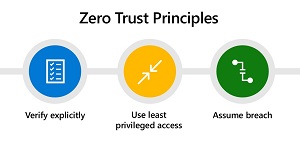
Zero Trust Principles from Gartner
Don’t Do It Yourself
Leading solution providers now incorporate the tenets of ZTNA. Comprehensive, end-to-end platform architectures to address even more use cases come from a single vendor or a mix of “best of breed” suppliers. This approach offers educational institutions and the public sector several advantages. Context-based access encompasses all users, all devices, all applications, and all workloads. Zero Trust provides uncompromising security by continuously examining all content to prevent both known and unknown malicious activity in real-time.
Furthermore, it enables global and consistent access security everywhere, regardless of the location of a user, device, or application. This is best achieved through physical, virtual, and cloud-native firewalls that leverage artificial intelligence and machine learning to enable context-based access on-premises, in the cloud, in remote work environments, or across campuses. Simply put, all traffic, whether to or from campus, the office, home, or, say, a cafe, goes through a cloud firewall and a series of checks.
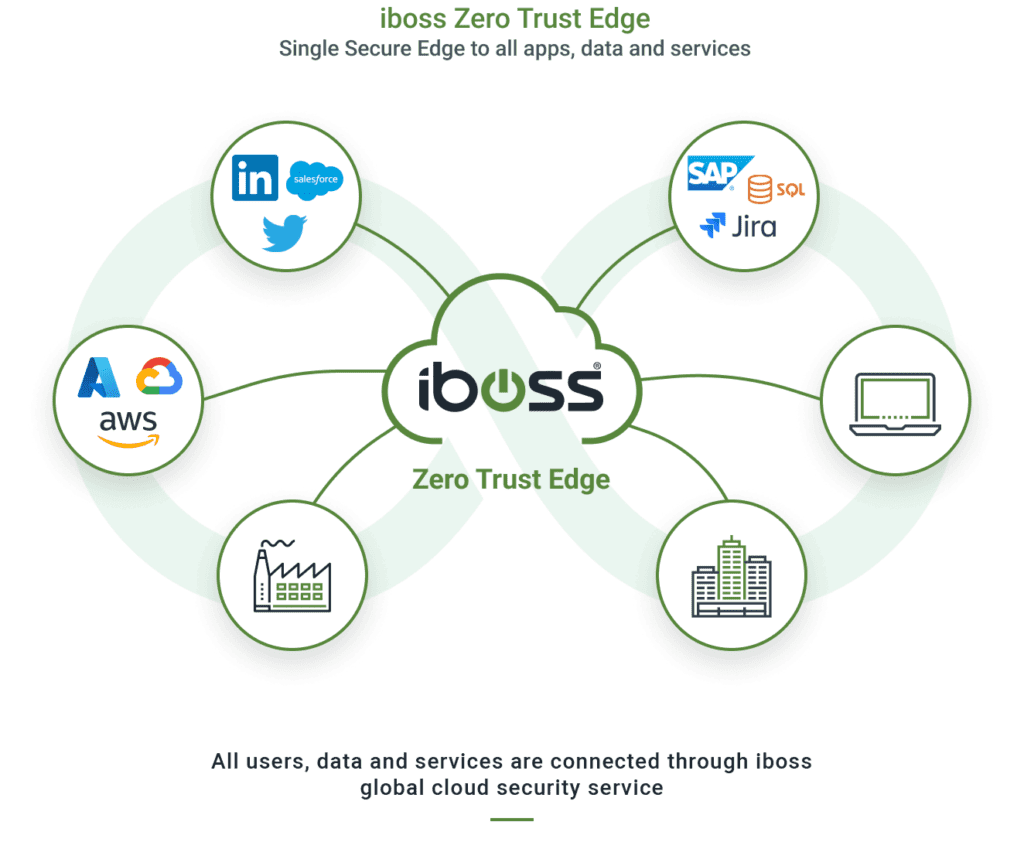
Example: iboss Secure Access Service Edge (SASE)
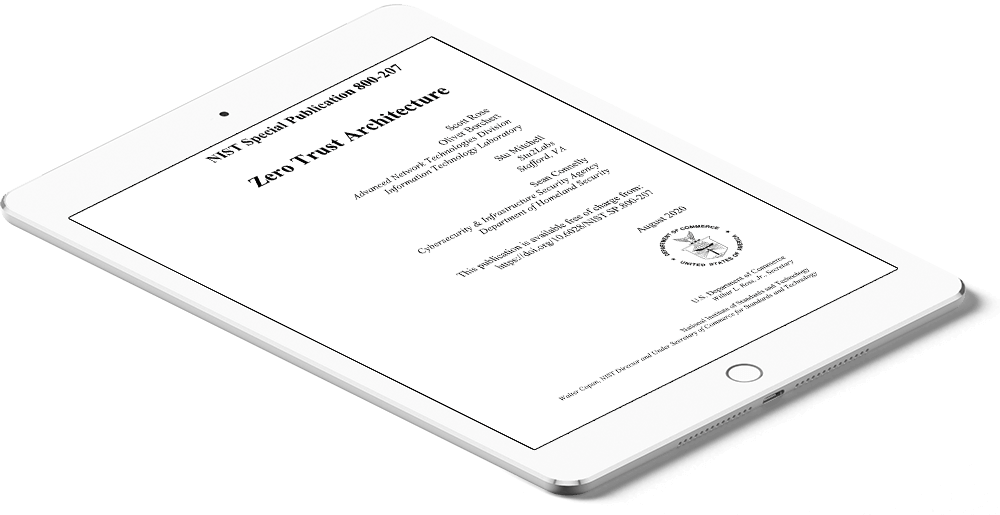
The iboss Zero Trust SASE allows all protected resources within an organization to be labeled and categorized, including Security Objectives and Impact Levels. This provides organizations with a clear understanding of where sensitive applications and data reside while providing insight into what users and assets are interacting with those protected resources. The iboss Service follows the NIST Risk Management Framework (RMF) and implements tenets from the NIST 800-207 Zero Trust Architecture Special Publication.
Components
Overall, Zero Trust represents a convergence of secure network transport with a cloud-native security stack that includes components such as ZTNA, Secure Access Service Edge (SASE), Cloud Access Security Broker (CASB), Secure Web Gateway, Firewall-as-a-Service), Software-Defined Wide Area Network (SD-WAN), and micro-segmentation. But don’t think of it as a “rip and replace“, but an additive approach to what you’re already doing.
Deep Dive: What is Zero Trust on AWS
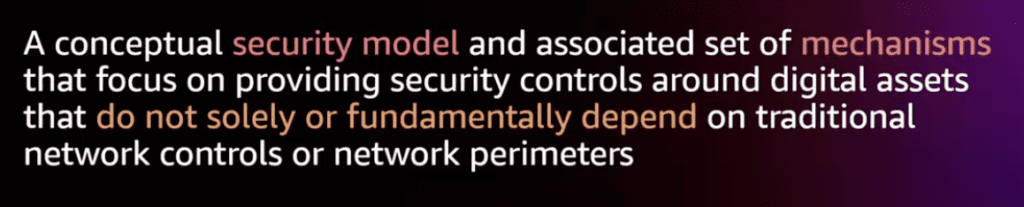
AWS describes Zero Trust as a security model that emphasizes strong identity verification and authorization rules before granting access to data, applications, and systems.
AWS definition of Zero Trust
Zero Trust is not solely based on network location and operates within highly flexible identity-aware networks, which reduce surface area and eliminate unneeded pathways to data. AWS provides several identity and networking services that can be used as building blocks for implementing Zero Trust. To move towards Zero Trust, AWS says, evaluate the workload portfolio and apply Zero Trust concepts, such as rethinking identity, authentication, and context indicators.
AWS, itself, implements Zero Trust in interesting ways. When using the console every API (application programming interface) call is authenticated. Also, when using services in an account, the services do not automatically have access to other services. You must set up a role that is authenticated when that service is instantiated and every call it maqkes. Security Groups and Network Access Control Lists are another way AWS implements Zero Trust. They can limit traffic north-south and east-west. Remember, Zero Trust is a process and architecture, not a product.
By adopting a Zero Trust approach, educational institutions and the public sector can strengthen their cybersecurity posture and better protect themselves against the ever-evolving threat landscape. Tech Reformers is a consultancy focused on education and the public sector that can help assess your needs.
Organizations want to spend money wisely, whether private sector, non-profit, government, or a school district. Superintendents and CFO’s strive for effective use of capital and operational cost savings. Operations leaders want the agility to meet the immediate needs of the district. CTO’s want a secure and resilient infrastructure that allows for innovation. And all school district leaders pursue equity to meet the needs of each student. What makes this all possible today? The cloud or “cloud computing.” The public cloud powers digital transformation that is impossible or impractical in traditional data center infrastructure that, today, still many districts operate.
EdTech companies have leveraged the public cloud for years. But, districts themselves have lagged. We’ll look at what the cloud is and how districts can leverage the advantages of the public cloud.
Google Apps
2006 “GAFE” logo
The cloud in K-12 began with Software as a Service (or SaaS). Third parties started to offer software on their cloud. In 2006, Google began to provide Google Apps and, from the beginning, it was free to schools. I had recently started at Envision Schools, a public charter school in the Bay Area. Google Apps appeared to be great for our students and staff. Our Microsoft Exchange server was a lot of overhead for our small organization. Consequently, I rolled it out Google Apps that summer for the start of the next school year. Most school districts have adopted Google (See below). So, today, couldn’t it be similarly said that much of the legacy data center infrastructure is overhead?
Google’s then vice president and general manager for enterprise, ironically a former colleague, outlined the benefits for customers.
“Organizations can let Google be the experts in delivering high-quality email, messaging, and other web-based services while they focus on the needs of their users and their day-to-day business.”
As they say, the rest is history. Today, Google Workspace, née Google Apps, controls over 80% of the EdTech Apps in the Education market and has 8 of the top 10 apps as measured by Learn Platform.
Chromebooks
Google was able to start a revolution in K-12 by offering its services on the cloud. The cloud provided simplicity, scalability, cost savings, agility, redundancy, and security that both Google and school districts needed. When Google added the Chromebook several years later, again, it leveraged the cloud. Management and storage leveraged the cloud while eliminating software on the device, so the browser did all the work. In 2013-2014, when I was Oakland Unified School District, we rolled out Google Chromebooks. Students and staff embraced Personalized Learning and equitable access (and a platform for online testing, not so much). At the time, Miquel Helft outlined the “The Dawn of the Chrome Age” in Fortune Magazine on April 10, 2014.
Today, almost every EdTech app runs in the cloud, also called Infrastructure as a Service (IaaS). Most are on Amazon Web Services (AWS). As Bill Maher says, “I don’t know for sure, but I know it’s true.” EdTech companies choose the public cloud, AWS, Microsoft Azure, or Google Cloud Platform (GCP) because of the growing capabilities the cloud brings. Let’s look at some of the attractive features of the public cloud. And why IaaS is becoming the infrastructure of choice for most use cases universally.
Use of Capital
Use capital or operating funds?
One of the first considerations is the use of capital. In the old days, organizations invested in expensive hardware just to get started. This would include servers, network hardware, cabling, data centers, cooling, electrical upgrades, real estate, and a long-term internet contract. Organizations also had to guess their need and often over-provisioned to not be caught under-resourced. All of this was a considerable capital expense that only well-funded or highly taxed organizations could afford. School districts were faced with large bond measures or capital levies just to leverage the internet. These cost then repeat themselves.
Today, with the cloud, organizations need less capital investment. Expenses move from capital to operating expenses. Organizations can start up in the cloud at no cost. AWS, Microsoft Azure, and Google Cloud Platform (GCP) offer a free tier! You can then scale as applications and users come on board. Entrepreneurs with a good idea can start by simply building out what is needed with some or all services free. Any school district can cut down on upfront purchases. There is no need with the public cloud for large capital purchases of hardware. So the first advantage of the cloud is moving significant capital expenses to more nominal operating costs. If a district wants to use its capital funds, spend less upfront!
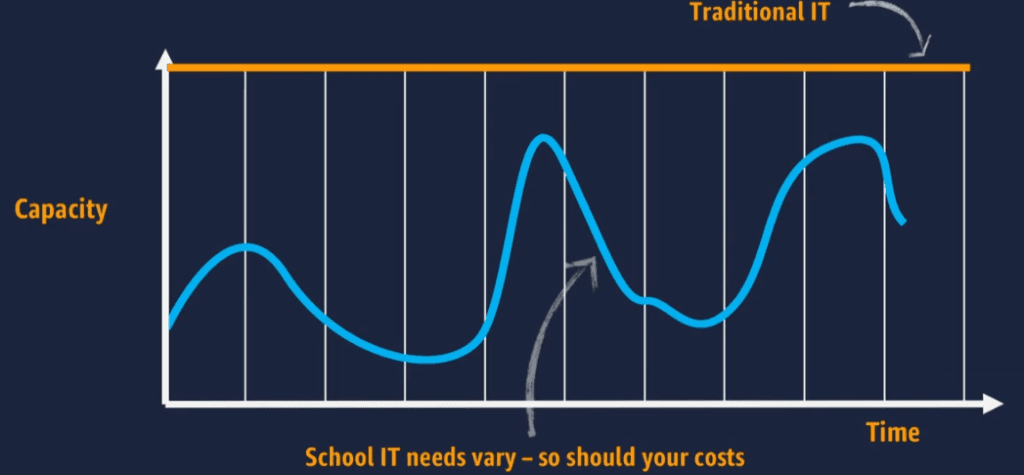
AWS analysis of School IT use
Agility and Scalability
The second advantage, related to the first, is agility and scalability. As I said, the cloud enables districts to start small, yet it allows them to be agile. IT can scale up (bigger, more powerful servers) or scale-out (more servers) as needed and when needed. The actual need determines whether to go quickly or slowly. In the cloud, servers can even be set to auto-scale. Hence, resources automatically expand when needed and, notably, scale down to save costs when the resources are no longer required.
Cost Savings
This leads to the third advantage, related to the first two, bottom-line cost savings. Traditionally organizations have had to over-provision for their busiest time. Imagine the early days of Amazon where they needed enough capacity for the Holiday shopping season. But servers sat idle the rest of the year. (That extra capacity is what gave them the idea to rent out their excess capacity and why we have AWS.). Now there is no need with the cloud to buy extra capacity for busy times or “just in case.”
Similarly, the cloud enables users to turn off and not pay for resources that are not needed. For example, organizations turn off servers at night when they are only used during business hours. Or IT can only start development (Dev) or testing (Test) servers when required. In the old days, organizations would purchase complete environments for Dev and Test and run 24×7 with requisite space, electricity, and cooling. The public cloud does not charge for servers that are not running. The cloud enables considerable cost savings when school districts manage their workloads and only pay when used.
Facility Costs and “Going Green”
Another area for cost savings that school districts often overlook is the facility costs. Often these costs are incurred not by IT, but a separate Facilities or “Buildings and Grounds” department. These costs include real estate, building space, electricity, fire suppression, cooling, and generators. These are all costs built into cloud services and are areas for savings for school districts. Cloud providers are experts in these areas, have huge economies of scale, and build the best, most cost-efficient infrastructure. AWS, for instance, describes its green initiative.
“AWS has a long-term commitment to use 100% renewable energy. When companies move to the AWS Cloud from on-premises infrastructure, they typically reduce carbon emissions by 88% because our data centers can offer environmental economies of scale. Organizations generally use 77% fewer servers, 84% less power, and tap into a 28% cleaner mix of solar and wind power in the AWS Cloud versus their own data centers.“
Why should districts try to build data centers and pursue green initiatives when the cloud can efficiently and environmentally be the data center? Then push the local utilities to offer green power for the rest. Some are close like Seattle with 97% renewable energy.
Resiliency and Security
Outsource physical security?
While districts eliminate significant capital investments, save money, and improve agility, they also strengthen resiliency and security, our fourth advantage. The public IaaS providers, AWS, Azure, and GCP, protect the security of the cloud. They provide physical security and resiliency/redundancy of the data centers. Availability zones (AZ’s or groups of data centers) and regions (geographically isolated areas with AZ’s) compound resiliency and redundancy.
I have some district data center memories. I remember when I was at Fremont Unified, and a water pipe broke. So we had water flowing under our district office data center! At Oakland Unified, the data center overheated, setting off alarms late at night. When I went in, scaffolding fell and barricaded me in the 110-degree room. At Seattle Public Schools, the Facilities department turned off electricity to the data center over a weekend, and the generator failed to kick in. Infrastructure as a Service, the cloud, will let districts avoid these war stories.
The public cloud also excels at backup and disaster recovery. Besides the ability to replicate over AZ’s and regions, the cloud has built-in backup, replication, serverless architecture, and security services that further improve resiliency and security. Many of these are at no additional cost.
Simply by using public cloud resources, districts get world-class security and resiliency unfeasible for most to build and staff on their own. Reducing risk is a significant advantage for K-12 leaders.
Be Wary of Misconfiguration Anywhere there is Data
Yet, despite cloud advantages, organizations must still provide security in the cloud. District IT engineers and administrators must configure and administer applications correctly. IT must secure access and networks. Like traditional data centers, stakeholders must govern access.
Misconfiguration is, by far, the biggest reason for public cloud data breaches per the Cloud Security Alliance. But, districts can improve their security and resiliency with diligent engineering and administration. The public cloud also offers excellent tools for security, access, and logging. Districts now can free up IT staff from running physical servers and data centers allowing them to concentrate on security and resiliency “in the cloud” along with innovation to pursue district goals.
These first four advantages of cloud computing, the wise use of capital, agility, cost savings, and improved security and resiliency, are enough for many to move to the cloud. But the first four are merely operational and tangible improvements that don’t capture some of the long-term value of cloud transformation. We will wrap up with advantages that produce better outcomes for district leaders, teachers, and students.
Innovation
The fifth advantage is innovation. The cloud offers many avenues for districts to improve efficiency, one area for innovation. Many districts see the efficiency advantages in their SaaS applications. Email has become more reliable. Saving documents on the cloud enables files to be available across devices. New applications are easy to find, adopt, and use, thanks to SaaS cloud applications. But Infrastructure as a Service, IaaS, has its own advantages. Districts can adopt cloud-enabled business process automation and “going paperless” in ways more potent than district data centers offer. The cloud can tap into Artificial Intelligence (AI), unavailable in data centers. Machine Learning (ML) takes process automation and digitization to new levels. Now districts can do not only complex text and image recognition but also video and language processing.
Similarly, AI and ML can help with student data. Seattle Public Schools envisioned a system on the AWS Cloud as part of the City on a Cloud Innovation Challenge. Advanced data services, such as predictive analytics was not possible with their on-premises infrastructure.
Equity
What the big companies might not think about when it comes to the cloud is equity. But the cloud can enable just that. As explained above, advanced data analytics, Artificial Intelligence, and Machine Learning can bring new insights to data. Heretofore, educators think of metrics then plot data against a known metric. But what if AI could surface causality from disparate data points unimagined by educators or traditional data systems? New insights enabled by the cloud could bring avenues to closing opportunity gaps. Cloud data capabilities can help ensure educators meet the needs of each individual student.
Remember the Chromebook, part of the cloud revolution in education? Chromebooks had 60% of the Education marketing in 2018. But, the demand exploded with the pandemic, and 30 million Chromebooks shipped in 2020. While we wait for the actual estimate of the percentage of Chromebooks in schools in 2021-2022, we need to address an equity gap. “What?” you say, “Haven’t Chromebooks improved equity by providing equitable access to devices?” True. Low-cost, web-only computers expand the breadth of distribution, closing the so-called homework gap. However, there’s now a gap between those with powerful full-featured multimedia workstations at home and those with just a district-issued Chromebook.
Cloud Brings Equity
While some students go home with just a Chromebook, others eschew the simple laptop and log into their desktop. A powerful processor and graphics card enables them to go deeper into programs introduced at school in CTE, graphics, multimedia, computer science, and other classes. Programs such as Adobe Photoshop, Adobe Premiere, Autodesk, Blender, and Visual Studio need a standard Windows or Mac computer. Or these privileged students may do competitive gaming, now an avenue to a college scholarship. Students with just Chromebooks are missing out again on opportunities.
But wait. With the cloud, Infrastructure as a Service – IaaS, that opportunity gap disappears. A Chromebook or any home computer with an internet connection can tap into all the powerful applications streaming from powerful computers in the cloud. Fife School District deployed AWS Workspaces and AppStream 2.0 to “make students innovators 24-hours a day,” and it “fills a void in equity in education.” Tech Reformers offers a streaming service for apps on a per-student subscription basis.
Districts Should Pursue Cloud Further
Like Google Apps and the Chromebook, the cloud is offering new opportunities for districts. CFO’s should be looking for wise use of capital and money savings. CTO’s should be gaining agility and scalability to efficiently meet district goals while improving security and resistance to lower district risk. All district leaders should recognize opportunities for innovation and equity with new data capabilities and resources only available in the cloud. It’s time to get on board with the cloud revolution.